How do I model future ACA premium growth?
ACA marketplace premiums tend to grow faster than general inflation, and your premium also goes up as you age. ProjectionLab does not predict future premium changes for you, but it gives you a few targeted knobs to express your own assumption about how they will grow. This article walks through the available knobs and the configuration patterns that work well for early-retirement plans.
Note
ProjectionLab does not give financial advice. The growth assumption you choose is yours to decide based on your expectation of how ACA premiums will change over time. The goal of this article is to explain how the inputs work so you can make that decision well.
How the growth knobs work
Every ACA Marketplace expense has two settings that govern how its Starting Amount evolves: the Currency (default: Grow From Today) and the Change Over Time modifier (default: Match Inflation +2%). Together they mean the value you enter is treated as today’s dollars and grows each year at your plan’s inflation rate plus an extra two percentage points – without any further configuration on your part.
The Benchmark Premium field uses the same Currency and Change Over Time settings as the Starting Amount. You don’t configure them separately – whatever you set on the Starting Amount carries through to the benchmark used to estimate your subsidy each year.
Don’t double-count the inflation modifier
The most common mistake is stacking your premium-growth expectation on top of the inflation rate twice.
If you expect ACA premiums to rise about 4.5% per year in nominal terms and you have plan inflation set to 3%, the modifier you want is +1.5%, not +4.5%:
nominal growth = inflation + modifier 4.5% = 3% + 1.5%
Setting the modifier to +4.5% on top of 3% inflation would give you 7.5% nominal annual growth, which is much steeper than what you intended. The default of Match Inflation +2% on top of 3% inflation works out to 5% nominal growth per year, which is a fairly conservative starting point, especially over long time horizons.
What age should I price the premium for?
Healthcare.gov returns a different premium depending on the age you enter, and your premium goes up year over year as you get older even if rates don’t change. Three configurations work, each useful for different situations:
Option 1: price for your future self. When you fetch your unsubsidized premium and benchmark from healthcare.gov, enter the age you will be in the year the expense starts. Set the Starting Amount’s currency to Today’s Currency – the quote is in today’s dollars but already reflects your future age. The premium increase from aging between now and your start year is already baked into the future-aged quote, so Change Over Time only governs growth from the start date forward. 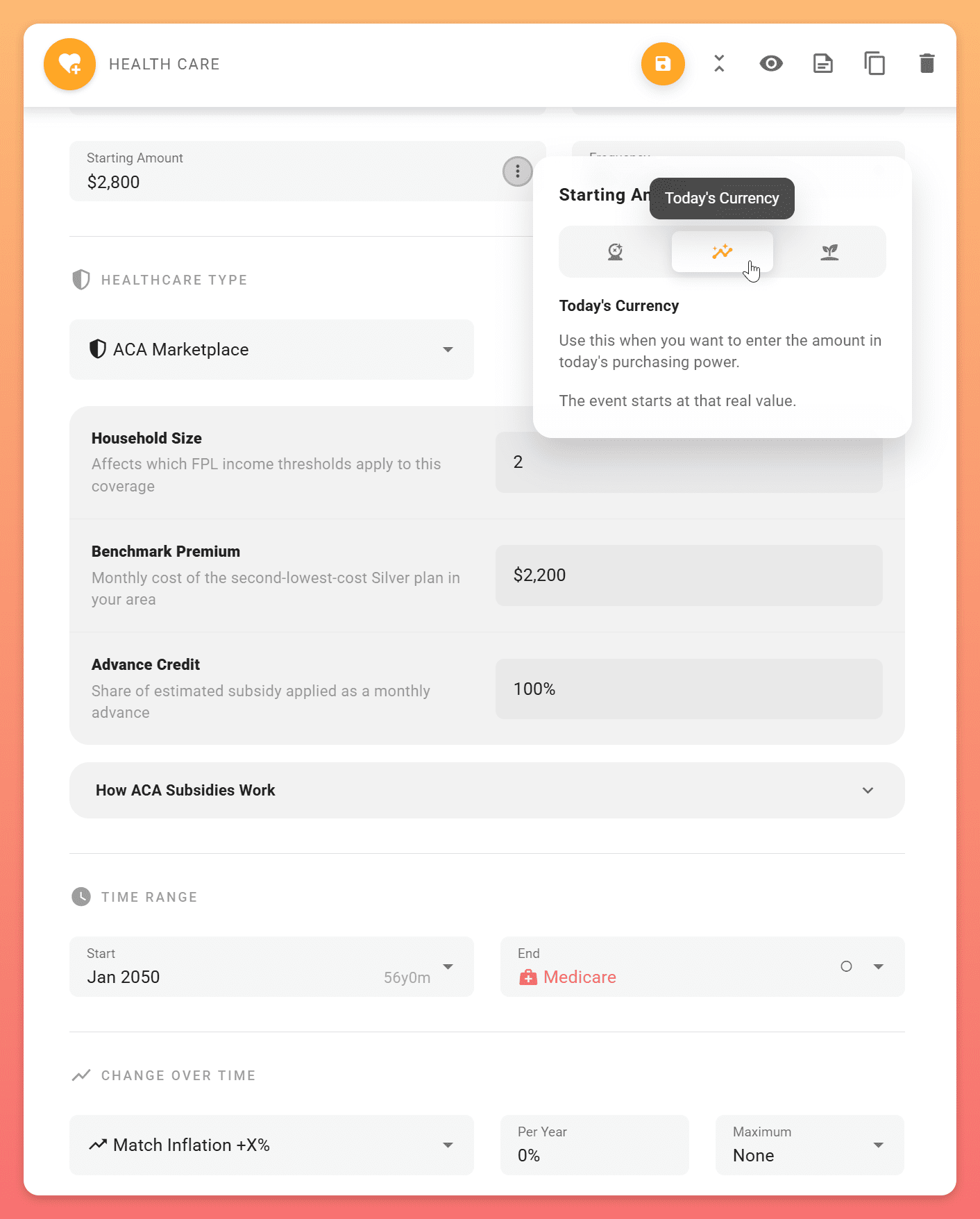 The default of Match Inflation +2% is a reasonable starting point; pick whatever matches your expectations for premium growth after coverage begins (the screenshot above uses +0% to isolate the future-aged-quote effect). This implicitly assumes rates don’t drift much between now and your start date; if you expect meaningful drift in the meantime, either bump the Starting Amount up by hand to account for it, or use Option 2 instead.
Option 2: price for your current self and let it grow. Enter today’s premium for your current age and set the Starting Amount’s currency to Grow From Today. Set Change Over Time to Match Inflation +X%. The modifier does double duty here: it captures both general premium drift and the price increases from aging through the rest of your plan. This is simpler if you’re modeling a long horizon and don’t want to re-fetch quotes for a future age. Since the modifier is doing two jobs, spot-check the modeled ACA premium in the final year of coverage to make sure the value looks reasonable for someone of that age – if it’s off, that’s the signal to adjust the modifier. 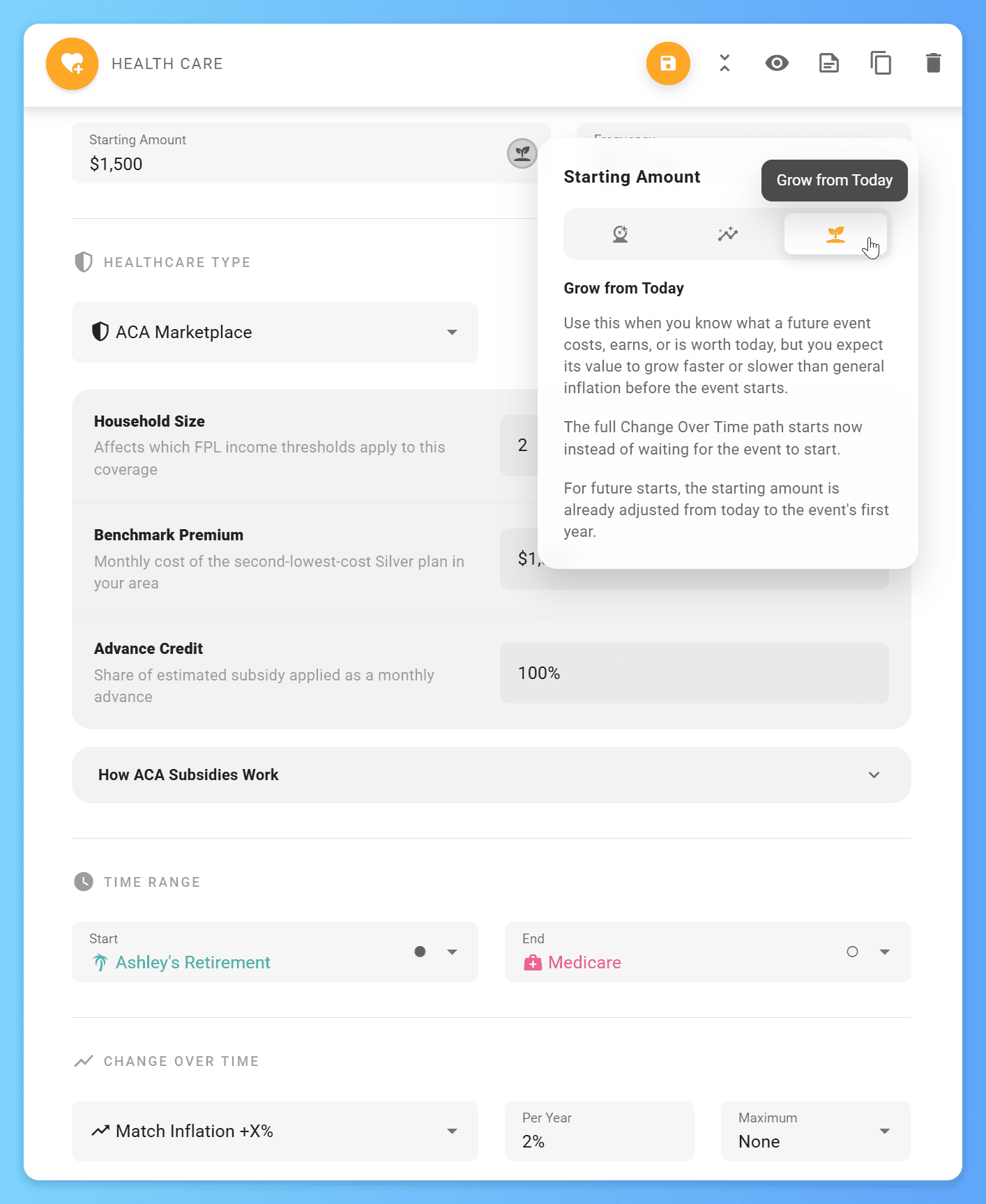
Option 3: precise year-by-year modeling (advanced). If your retirement start date is dynamic (driven by a milestone rather than a fixed year), or you want to model premiums against real historical data rather than a single modifier, set the Starting Amount’s currency to Grow From Today and Change Over Time to Advanced. Advanced lets you specify growth values year by year, or sample a few control points and let ProjectionLab interpolate between them. This is the only configuration that captures lumpy realities like the price jumps that hit around age 50 and 60, or a specific historical pattern you’ve sourced from rate filings or KFF’s marketplace premium data.
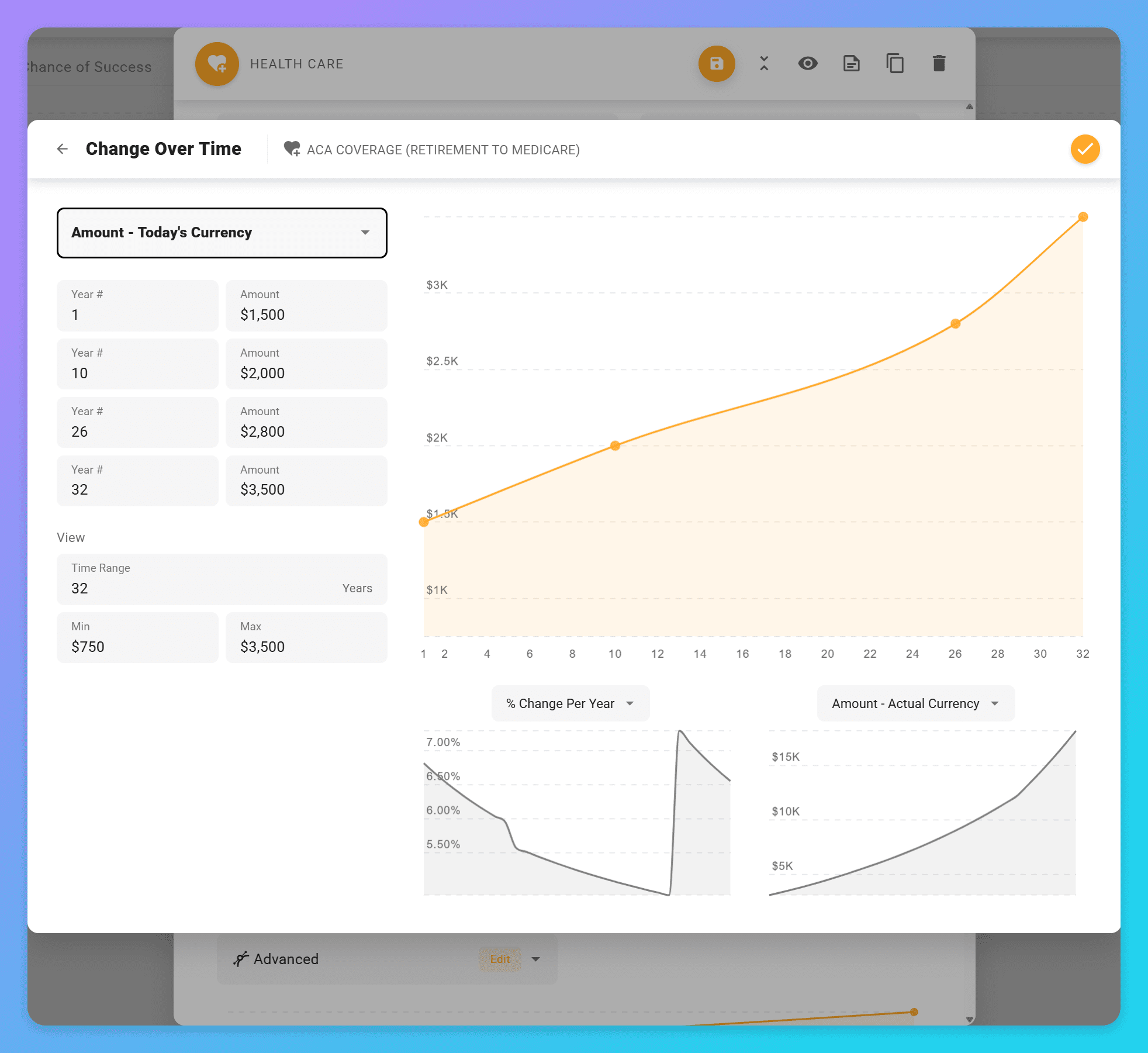
Pick whichever matches how you obtained your reference numbers and which lever you’d rather adjust if you want to change the prediction later.
Modeling household composition changes
A single ACA Marketplace expense item assumes a stable household and age curve. When something material changes mid-plan – a spouse hits Medicare, a child ages off coverage, you move to a state with a different exchange – the cleanest pattern is to chain multiple ACA Marketplace expenses end to end, one per phase:
- End the current expense in the year of the transition.
- Add a new ACA Marketplace expense starting the following year, with its own Starting Amount, Benchmark Premium, and Household Size for the new phase.
- Repeat for each subsequent transition.
Stress-testing your assumption
Open Compare -> What If to adjust your premium-growth modifier against your baseline plan. It’s the most direct way to see how much your assumption matters.
As you toggle the modifier, Subsidies, Expenses, and Net Legacy are good lines to keep an eye on – they’re typically where changes to an ACA Marketplace expense show up first. The modifier compounds aggressively across decades, so the gap between Match Inflation +1% and +3% can shift your modeled total cost of coverage by tens of thousands of dollars over a long horizon. If Net Legacy meaningfully diverges across your modifier range, your plan’s long-run outcome is sensitive to this assumption, and it’s worth grounding your modifier in real premium history before you commit.
Tip
Compare -> What If is the right starting point for narrow assumption changes like adjusting one modifier. For substantial plan changes, consider cloning your plan as a snapshot and re-running Optimize on the modified plan – a bigger change can shift which Tax Strategy is actually optimal for your goals, and What If alone won’t surface that.
Related reading
- How to Navigate ACA Premiums in ProjectionLab walks through where to find your Starting Amount and Benchmark Premium and how to enter them.
- Today’s Currency vs Actual Currency covers the Currency setting referenced in Option 1 above.
- Modeling Inflation Spikes shows how to apply the same Change Over Time mechanics to other expenses if you want to stress-test broader inflation assumptions.
If you have a configuration question this article didn’t cover, reach out at help@projectionlab.com or join the conversation on the ProjectionLab Discord.
Related

Disclaimer: The content, tools, and resources on ProjectionLab.com are intended solely for informational and educational purposes and should not be construed as professional financial or investment advice. Our materials are designed to provide general guidance and are based on the input and data provided by users. ProjectionLab makes no guarantee of the accuracy, completeness, or applicability of this content to individual circumstances. Effective financial planning and investment involve comprehensive consideration of a wide array of personal financial factors. The tools and resources available on ProjectionLab are aimed at helping users develop an understanding of their financial trajectory. However, they should not be solely relied upon for creating a complete financial plan. We strongly recommend consulting a financial services professional who can provide personalized advice based on your unique financial situation before making any significant financial decisions. While we endeavor to keep the information on ProjectionLab current and accurate, the content may differ from that found on other financial institutions, service providers, or specific product sites. All content and tools on ProjectionLab are provided without any guarantees or warranties of any kind.