Plan in the United Kingdom
ProjectionLab offers a growing list of international tax presets, account types, and display currencies.
For the UK, that includes income tax for each nation, including Scotland’s bands, ISAs, workplace pensions and SIPPs, PCLS and UFPLS withdrawals, and the Lump Sum Allowance. You can also use April-to-April plan years.
Under Account Settings > Location, choose United Kingdom and the nation where you live. Scotland has different income tax bands, so check that second choice before reading your forecast. Your plan’s location appears under Settings > Tax > Tax Estimation.
Add ISAs and pension accounts
On Net Worth, select + beside Search accounts and set the country filter to GB. Choose Stock ISA, Lifetime ISA, Workplace Pension, or SIPP (self-invested personal pension), then enter your balance and owner. The country filter changes the available types, not accounts you already added.
Use Flows for contributions. For a workplace pension, open the Flow’s Goal and check the salary Source. With Qualifying Earnings on, the contribution percentage applies only to pay within the qualifying band, rather than your whole salary.
UK Limit applies the shared ISA limit per person, including the separate Lifetime ISA cap. For pensions it accounts for the tapered annual allowance and the lower Money Purchase Annual Allowance after taxable flexible withdrawals. If you need to include unused pension allowance from earlier years, use Custom Limit under Yearly Contribution Limit and set the Flow’s Time Range to the years it applies.
Choose how to draw your pension
Open the pension account and select Plan > Drawdown. PCLS (pension commencement lump sum) takes tax-free cash upfront. UFPLS (uncrystallised funds pension lump sum) spreads the tax-free portion across withdrawals. Check Percent Tax-Free as well as the method.
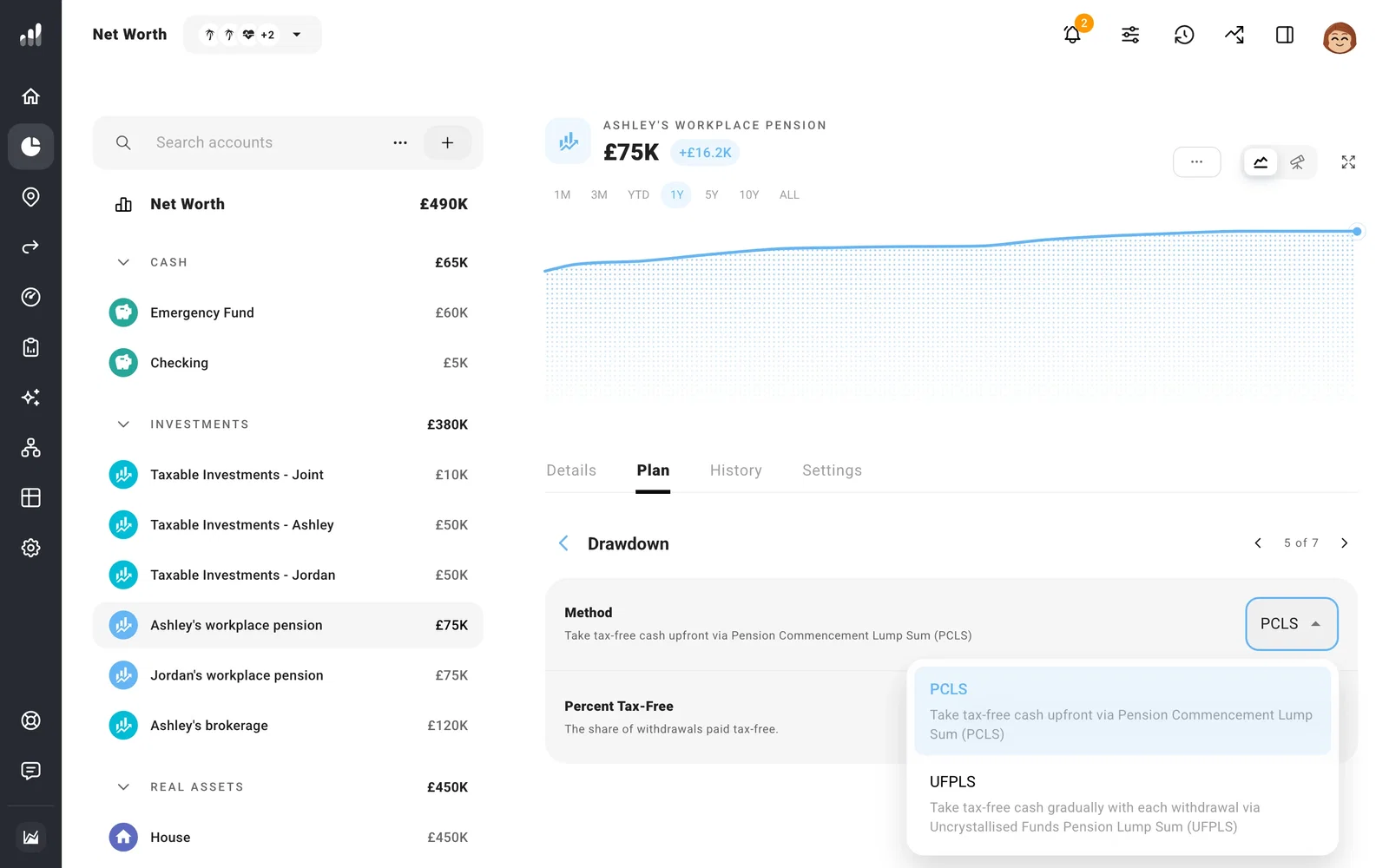
ProjectionLab tracks the per-person Lump Sum Allowance across pensions. Once that allowance or the account’s tax-free entitlement is used, later withdrawals can be fully taxable.
A pension that promises a regular payment, rather than an account balance you draw down, belongs under pension income.
Check your State Pension and tax year
Under Plan > Income, check each person’s State Pension amount and start date against their own estimate. If it is missing, add pension income.
Change Year Alignment to UK tax year if you want April-to-April totals. ProjectionLab starts those modeled years on 1 April. This changes which events fall within each displayed year.
