Add retirement contributions
Saving for retirement? Add your contributions to see how much you could have when you stop working.
Workplace plans
For a 401(k), 403(b), or 457(b), start with the salary the contributions come from.
- Go to Plan > Income and open your salary.
- Select Add contribution and choose your retirement account. If it isn’t in your plan yet, choose New account.
- Enter how much you contribute, usually a percentage of your pay.
- Enter what your employer adds, if anything, and select Add.
Your contributions stop when that salary does. If you’re planning a job change, add contributions to the new salary too.
Your employer match
Say your employer matches 50% of what you put in, on the first 6% of your pay. Choose % of Yours Capped at % of Earnings, enter 50%, and set the limit to 3%, since that’s the most your employer will add.
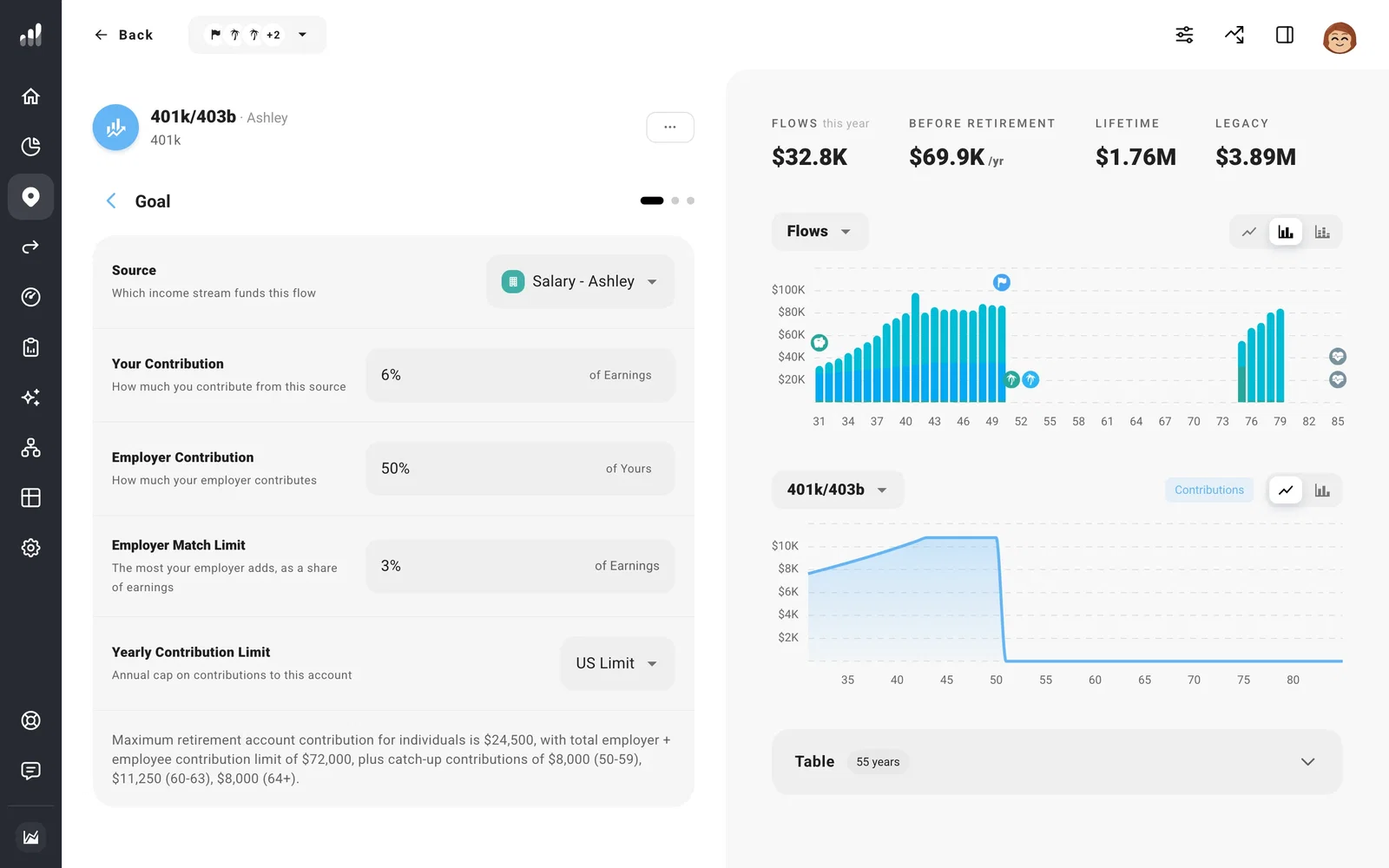
If your employer adds a set percentage of your pay whether or not you contribute, choose % of Earnings instead.
Maxing out
To contribute the most you’re allowed, enter an amount at or above the yearly limit. ProjectionLab keeps your contributions within each year’s limit, including the higher catch-up limit from age 50 and the larger one at ages 60 to 63.
If your plan allows after-tax contributions beyond that, see Plan a Mega Backdoor Roth contribution.
Health savings accounts
If you have a health savings account (HSA) through work, add it the same way: select Add contribution on your salary and choose your HSA. Contributions lower your taxes now, and you can pay medical costs from the account later.
IRAs
Individual retirement account (IRA) contributions usually come from your own savings rather than your paycheck, so add them in Plan > Flows.
- Select Add to Fund with Income and choose your IRA or Roth IRA.
- Enter an amount, or choose Maximize Contribution to contribute up to the yearly limit.
- If you plan to stop when you retire, set Time Range to end at Retirement.
If your income is too high to contribute to a Roth IRA directly, see Plan a Backdoor Roth IRA contribution.
Roth or traditional
Pre-tax contributions lower your taxes now; Roth contributions are taxed now and qualified withdrawals are tax-free in retirement.
Employer contributions go into a traditional account unless your plan makes them Roth. If yours does, turn on Roth Employer Contributions.
Once you reach catch-up age, Roth Catch-Up Contributions appears on traditional workplace plans. Turn it on if your catch-up contributions go to Roth, as they must for higher earners under current rules. Your regular contributions stay traditional.
If you’re self-employed
A Solo 401(k) lets you contribute as both the employee and the business. A SEP IRA (Simplified Employee Pension) takes contributions from your business. Add the account from your business income. To model contributions at the applicable limit, choose Max Allowed.
See where you’ll be
Open Plan > Overview and switch the chart to By Account to see each retirement account grow until the year you retire.
If something looks off
My contributions stop sooner than I expected
Open the salary’s Time Range. Until stops before the retirement date; Through includes it. Contributions attached to that salary stop with it.
My IRA contribution is less than I entered
Traditional and Roth IRAs share one yearly limit per person, and direct Roth IRA contributions are also limited by income. Earlier Flows may use up that limit or the money available.
